ggplot(adelie, aes(x = bill_length_mm, y = bill_depth_mm)) +
  geom_point(alpha = 0.6) +
  labs(x = "Bill Length (mm)", y = "Bill Depth (mm)") +
  theme_minimal()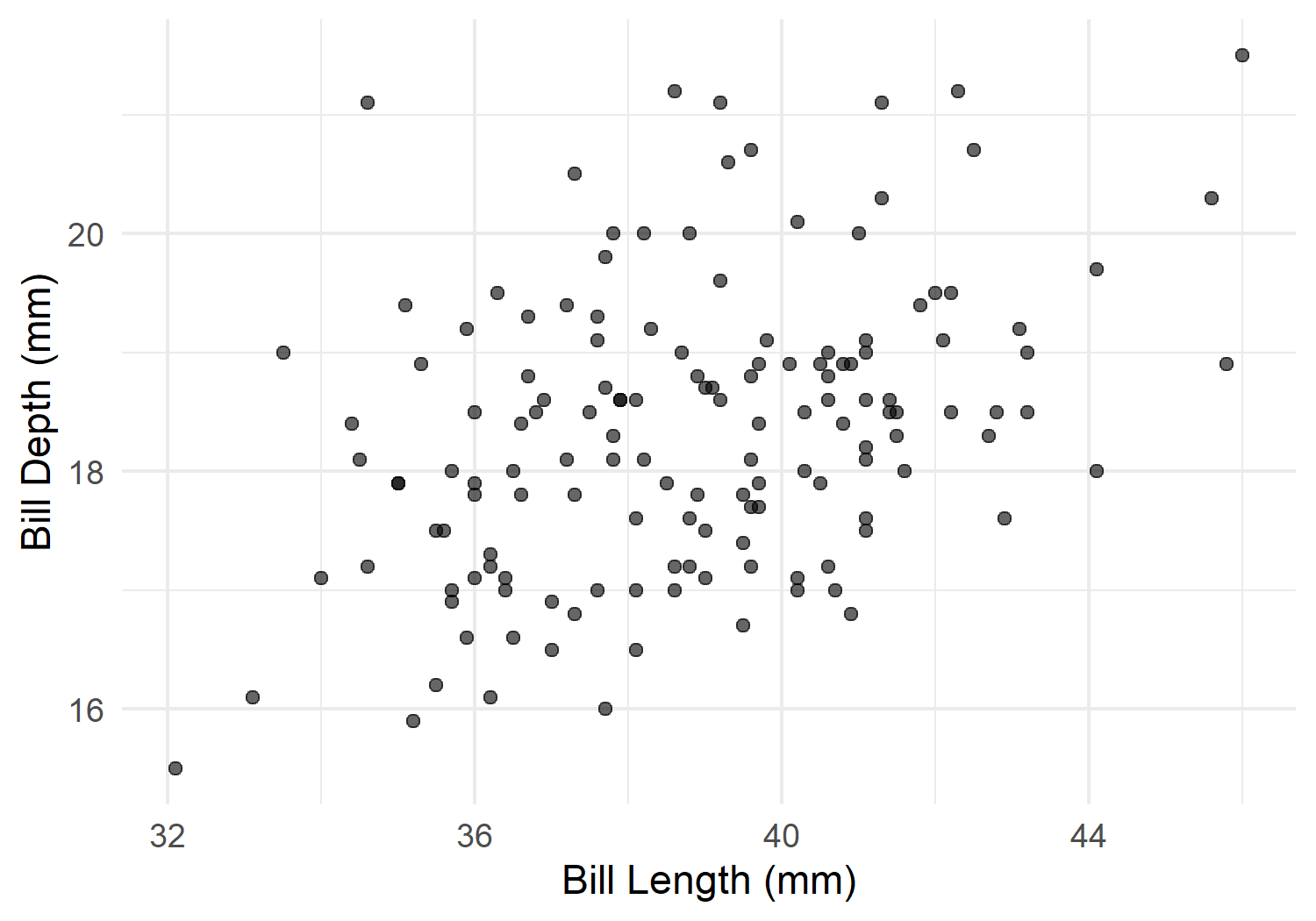
In scientific documents, you often refer to tables, figures, or specific sections: “as shown in Table 1” or “see Figure 3”. With Quarto’s cross-reference system, these references are automatically numbered and updated - if you add or remove a figure, all numbers adjust automatically.
Cross-references work in two steps:
@label
Quarto automatically replaces @label with the correct number and turns it into a clickable link.
The label must start with fig-:
ggplot(adelie, aes(x = bill_length_mm, y = bill_depth_mm)) +
geom_point(alpha = 0.6) +
labs(x = "Bill Length (mm)", y = "Bill Depth (mm)") +
theme_minimal()In the body text, you write:
As shown in @fig-scatter, there is a positive relationship between bill length and depth.This becomes: As shown in Figure 1, there is a positive relationship between bill length and depth.
For cross-references to work, the figure needs both a label (with fig- prefix) and a fig-cap (figure caption).
The label must start with tbl-:
@tbl-summary shows the key statistics.This becomes: Table 1 shows the key statistics.
Sections receive their label directly after the heading:
# Methods {#sec-methods}

Here we describe the methods...

# Results {#sec-results}

The results were obtained using the methods described in @sec-methods.## Data Collection {#sec-data-collection}
### Sample {#sec-sample}
As described in @sec-data-collection...Quarto offers different formats for references:
| Syntax | Output |
|---|---|
@fig-scatter |
Figure 1 |
@tbl-summary |
Table 1 |
@sec-methods |
Section 1 |
[-@fig-scatter] |
1 (number only) |
(@fig-scatter) |
(Figure 1) |
By default, references use the full prefix (“Figure”, “Table”). Use -@fig-scatter to suppress the prefix and get just the number, e.g. when you want to write your own prefix in plain text:
The data show a clear trend (see Figure [-@fig-scatter]).For non-English documents, you can customize the reference labels in the YAML header:
---
title: "My Report"
lang: de
crossref:
  fig-title: "Abbildung"
  tbl-title: "Tabelle"
  fig-prefix: "Abb."
  tbl-prefix: "Tab."
---
With these settings, @fig-scatter becomes “Abb. 1” instead of “Figure 1”.
Here is a document excerpt with cross-references:
# Introduction

This study examines the morphology of Adelie penguins.

# Methods {#sec-methods}

We analyzed 146 individuals from three islands.

# Results

@tbl-descriptive summarizes the descriptive statistics.
As shown in @fig-morphology, bill length and depth correlate
positively (see also @sec-methods for details on data collection).

```{r}
#| label: tbl-descriptive
#| tbl-cap: "Descriptive statistics by island"
# Table code here
```{r}
#| label: fig-morphology
#| fig-cap: "Relationship of bill measurements"
# Plot code here
```
# Tips and common errors

## Label rules

- **Prefixes are required**: `fig-`, `tbl-`, `sec-`
- **No special characters**: Only letters, numbers, hyphens
- **Unique**: Each label can only occur once
- **Lowercase recommended**: `fig-scatter` not `fig-Scatter`

## Common errors

| Problem | Solution |
|---------|----------|
| Reference appears as `@fig-xyz` | Label or caption missing |
| "Figure ??" | Label does not exist or typo |
| Wrong numbering | Use unique labels |

:::{.callout-tip}
If cross-references are not working, check:

1. Does the chunk have a `label` with the correct prefix?
2. Does the figure have a `fig-cap` / the table have a `tbl-cap`?
3. Does the spelling of the reference exactly match the label?
:::

# Customizing numbering

By default, Quarto numbers continuously. For chapter-wise numbering:

```yaml
---
crossref:
  chapters: true
---
Then figures are numbered as “Figure 2.1”, “Figure 2.2”, etc.
tbl-, fig-)@label
In Chapter 8, we will learn how to add a table of contents and adjust the page layout - including landscape orientation for wide tables.
@online{schmidt2026,
  author = {{Dr. Paul Schmidt}},
  publisher = {BioMath GmbH},
  title = {7. {Cross-References}},
  date = {2026-06-08},
  url = {https://biomathcontent.netlify.app/content/quarto/07_cross_references.html},
  langid = {en}
}